What is Referoo?
Quick Overview
Your recruiter or hiring manager is using Referoo, an online platform that helps organisations complete reference and background checks digitally.
You've received an invitation to your secure Candidate Dashboard, where you can provide your information, nominate referees and complete any required background checks.
Once you nominate your referees, they'll be contacted by email and/or SMS so they can complete your reference securely online.
How Referoo Works
Adding You to Referoo
Your recruiter or hiring manager adds your full name, email address and phone number to their company's Referoo account. They also choose the checks they'd like you to complete, such as:
- Reference Check
- Police Check
- Right to Work Check
Once your details have been added, you'll receive an email and/or SMS inviting you to complete the required checks online.
Your Candidate Dashboard
Select the link in your email or SMS to open your Candidate Dashboard. This is where you'll sign the Consent Statement, confirm your details, and complete and track your checks.
Confirming Your Details
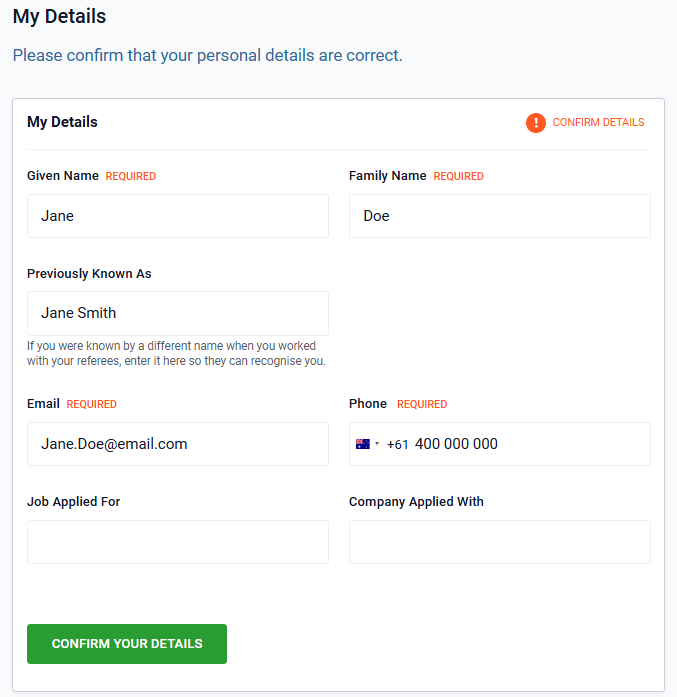
Once you've signed the Consent Statement, you'll move to the My details section. Please review all your details carefully before confirming them, as they can't be edited once confirmed.
You can also fill in the optional Previously Known As field. Use this if you were known by a different name when you worked with your referees (for example, a maiden name or a preferred name), so they can recognise who you are.
Completing Your Reference Check
For a Reference Check, you'll be asked to provide each referee's:
- Full name
- Email address and, ideally, mobile phone number
- Relationship to you
Once you've submitted their details, each referee will be contacted by email and/or SMS, either automatically or once your recruiter sends their invite. Your referees can then accept or decline the request. For step-by-step help, see How to Add Your Referees in Referoo.
Completing Additional Background Checks
As well as a Reference Check, you may be asked to complete other background checks. Use the links on your Candidate Dashboard to open the secure page for each check and provide the information required.
Checking Your Progress
Once you've provided your information, your dashboard shows a Summary page with a status icon next to each section, so you can see what's complete, what's underway and whether anything is still needed. An EDIT or VIEW button next to each item shows whether you can still change it. For more, see Understanding Your Candidate Dashboard Summary Page.
To see where each referee is up to, see Referee Statuses.
How Your Referees Complete Your Reference
When a referee accepts your request, they'll be taken to a secure online form where they:
- Sign the consent statement
- Review and confirm the contact and relationship details you provided
- Complete your recruiter's reference questions
- Submit their responses
Once they've submitted their reference, they'll see a confirmation screen and can close the page. Your recruiter then receives the completed reference.
Frequently Asked Questions
What is Referoo?
Referoo is an online platform that recruiters and hiring managers use to collect references and complete background checks digitally.
Why did I receive a Referoo email or SMS?
A recruiter or hiring manager has requested reference and/or background checks as part of your application.
How do I complete my checks in Referoo?
Select the link in the email or SMS you received to open your Candidate Dashboard, then follow the steps to complete each required check.
How do referees submit references?
Once a referee accepts your request, they complete the reference questions online through a secure Referoo page.
Need Help?
Please reach out to support@referoo.com or through the Referoo Chatbox on any Referoo
page if you have any questions!