Identity Verification FAQ (TrueVault)
Frequently Asked Questions
What is TrueVault and why am I being asked to verify my identity?
TrueVault is a secure digital identity verification platform. You're being asked to verify your identity so that you can meet compliance requirements and ensure you are who you say you are.
How do I start the identity verification process?
You'll receive a secure link via SMS, email or be prompted in the session to complete your identity verification with TrueVault.
Simply tap or click the link to begin. You’ll be guided through a step-by-step flow to complete your verification.
Mobile & Email Enrolment
Why do I need to provide my mobile number and email address?
These details help us link your verified identity to you and provide secure communication throughout the process.
With your email address and mobile number, its best that you use your personal numbers and accounts, as you might not have ongoing access to your work or school email/mobile in the future.
⚠️Please ensure that you have access to the mobile number and email address as we will be sending you a code to both services.⚠️
Will I receive marketing messages?
No. TrueVault only uses your contact details for secure verification and essential notifications.
What if I entered the wrong mobile or email?
If you noticed that you didn’t get a code because you have entered in the wrong email address or phone number, you can change by scrolling down and selecting “change my contact details”.
⚠️ Please note once an email address and mobile phone number have been enrolled to a person identity they cannot be used again by anyone else.⚠️
Uploading Your ID
What documents can I use?
To start with, we need a document that has a picture of you on it, this includes:
• Current/Valid Australian Issued Driver Licence;
• Any Current/Valid Passport
Do I need to upload a file or photo?
No uploads required. Use your device camera to scan your document securely. This proves you are in physical possession of the ID at the time of verification
What is biometric verification and why is it needed?
We use a short video selfie to match your face to your ID. This confirms you’re physically present and not using someone else’s documents.
How is my facial data used?
It’s encrypted and used only to verify your identity in real-time and you use your face to log into TrueVault and approve the sharing of any of your personal information. This ensures you and only you has access and control over your data and what you share.
What if my face scan doesn’t work?
Make sure you’re in a well-lit space, remove any headwear, and follow on-screen instructions. If needed, you can retry the scan.
To ensure successful verification:
- Clean your phone's camera lens.
- Ensure you are in bright light, either natural, or a well lit area.
- Ensure you hold your phone still.
- Avoid glare, reflections or obstructions.
- Do not cover the document with your fingertips.
- Documents must be original. Photos or digital documents will not be accepted.
- Carefully follow the on-screen instructions.
Why am I asked to manually enter document details?
So we can match your documents data with government databases.
✍ Manual entry ensures we verify your ID against an authoritative source.✍
What if I have a single name?
If you are a person with a single name please ensure that you include the full name as a “single name” when prompted.
If this prompt isn’t available then put the full name in the “Surname” field only and leave the first name blank.
❗️To avoid errors, don’t put your name twice or spread your name across first name / surname fields.❗️
What if I have a middle name?
If you are entering your name data as a part of verifying your Australian drivers license, please ensure you DO NOT include your middle name if its not a specified field.
- Drivers Licenses usually only verify First Name and Surname only.
- To avoid errors, just include your first name and surname and omit your middle name.
- If a middle name field is available, you can enter your middle name in the field specifically marked “middle name”.
Privacy & Data Security
Is my personal information safe?
Yes. All your data is stored within Australia, encrypted and verified using secure government and industry channels.
TrueVault complies with strict privacy and security regulations.
Who can see my data?
You control who sees your data. Any data you want others to see will be explicitly shared by you.
What happens after I complete verification?
Your verified identity is linked to your TrueVault profile (TrueIdentity). There are no physical images of documents stored after verification and successful processing of your identity. All that remains is the data available for you to share.
Troubleshooting
I didn’t get my link. What now?
Check your spam folder and verify that your contact details are correct. If the issue continues, reach out to us at support@referoo.com
My document is unreadable or damaged what should I do?
Try another document type or contact support@referoo.com via the organisation that requested your identity details.
What happens if I am stuck?
Please reach out to us at support@referoo.com or through the Referoo Chatbox.
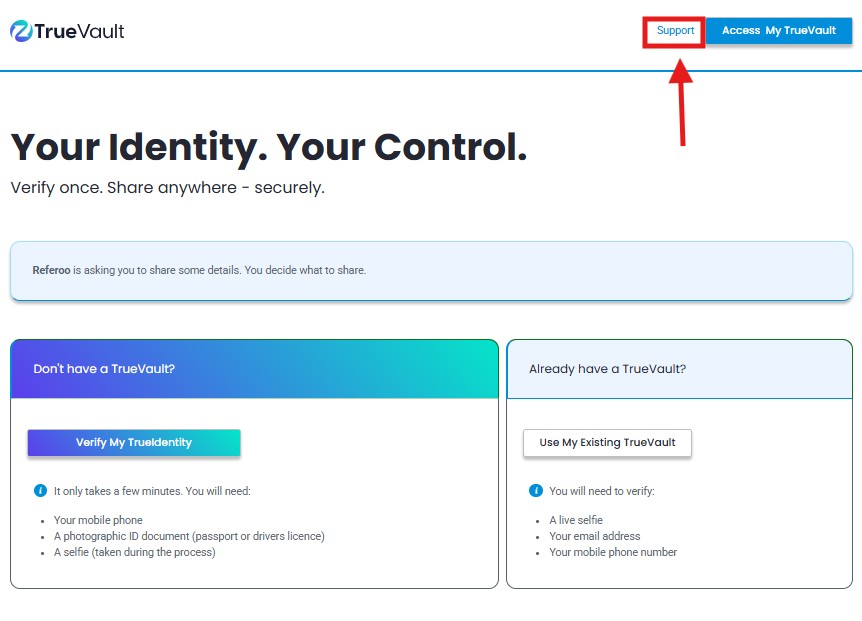
What to do when my selfie verification is failing?
TrueVault support team 1300 195 055 9am - 5pm (Monday-Friday) or you can directly submit a request in the portal.
Final Steps
How do I know I’ve completed the process?
You'll receive a success message at the end of the flow. The recruiter/HR Manager will also be notified.
Will I need to verify again?
Not necessarily. A TrueVault profile (TrueIdentity), can be reused with participating services helping you avoid repeated ID checks in the future.
Please reach out to support@referoo.com or through the Referoo Chatbox on any Referoo page if you have any questions!